
SMS services
Melbourne’s public transport system offers three SMS services so you can receive personalised train and tram service information via your mobile phone. Click on the links below for more information:
Train SMS services
Connex SMS updates
Connex SMS timetables
Tram SMS services
tramTRACKER
Connex SMS updates

Connex is the first public transport company in Australia to introduce SMS updates. SMS updates is a service that lets you know when metropolitan train services have been disrupted, cancelled or delayed by more than fifteen minutes, via text message to your mobile phone. The service is available from Monday to Friday, 6.00am to 8.00pm and is free of charge.
How to use Connex SMS updates To register go to SMS updates on Connex Melbourne’s website, fill in your details, nominate the line you travel, your departure and arrival stations and the times you usually travel. A confirmation SMS will then be sent. Replying yes to this SMS will complete your registration. You will also be sent an email confirming your log-in details to keep for your records.
Connex SMS timetables
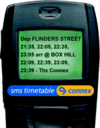
SMS timetables allows you to receive personalised train timetable information via your mobile phone. The most you will pay is 55 cents (inc GST) per SMS.
The service will return a SMS listing the relevant next four train departure and arrival times.
You can also specify a time and a date if you are travelling at a later time. This service is system wide so if a journey requires you to change trains, not only will you receive the departure and arrival times but also the station and departure times for the connecting trains.
SMS timetables feeds you up-to-the-minute timetable information for all weekday services between 6.00am and 8.00pm, including recently cancelled trains and extra services during special events. Scheduled timetables are available all other times.
How to use SMS timetables
STEP 1. Enter at least the first five letters of your departure station, leave a space and then enter at least the first five letters of your destination station. eg. flind richm Note: If travelling immediately skip to Step 4.
STEP 2. If travelling at a later time, leave a space and enter time of travel (12 or 24hr). eg. flind richm 915pm Note: If travelling on the same day skip to Step 4.
STEP 3. If travelling at a later date, leave a space, and enter date of travel (1-31). eg. flind richm 915pm 26
STEP 4. Send SMS to 19 726 669.
Further information
See SMS updates Q&As (will open in a new window)
See SMS updates terms & conditions (will open in a new window)
tramTRACKER

tramTRACKER is now available for users across the entire Yarra Trams network.
tramTRACKER is a service that lets you know when your tram is going to arrive at a particular stop, via the phone. You can call tramTRACKER from your landline or your mobile phone to find out whether your tram has been disrupted or delayed. You can also get tramTRACKER information via SMS.
How to use tramTRACKER
In order to use tramTRACKER you need to know your tramTRACKER Stop ID. Yarra Trams has given every tram stop on all routes its own Tracker Stop ID. This four digit number is displayed at each tram stop, or check Tracker Stop IDs in the list below.
To find your Tracker Stop ID number, please click on the relevant route number below:
|
Route 1 |
tramTRACKER ID Route 1 (PDF) 43.04 kB
|
|
Route 3 |
tramTRACKER ID Route 3 (PDF) 51.51 kB
|
|
Route 5 |
tramTRACKER ID Route 5 (PDF) 42.98 kB
|
|
Route 6 |
tramTRACKER ID Route 6 (PDF) 43.13 kB
|
|
Route 8 |
tramTRACKER ID Route 8 (PDF) 51.01 kB
|
|
Route 16 |
tramTRACKER ID Route 16 (PDF) 53.10 kB
|
|
Route 19 |
tramTRACKER ID Route 19 (PDF) 42.47 kB
|
|
Route 24 |
tramTRACKER ID Route 24 (PDF) 32.47 kB
|
|
Route 30 |
tramTRACKER ID Route 30 (PDF) 30.20 kB
|
|
Route 48 |
tramTRACKER ID Route 48 (PDF) 32.70 kB
|
|
Route 55 |
tramTRACKER ID Route 55 (PDF) 43.41 kB
|
|
Route 57 |
tramTRACKER ID Route 57 (PDF) 43.33 kB
|
|
Route 59 |
tramTRACKER ID Route 59 (PDF) 43.69 kB
|
|
Route 64 |
tramTRACKER ID Route 64 (PDF) 51.79 kB
|
|
Route 67 |
tramTRACKER ID Route 67 (PDF) 51.68 kB
|
|
Route 70 |
tramTRACKER ID Route 70 (PDF) 56.45 kB
|
|
Route 72 |
tramTRACKER ID Route 72 (PDF) 52.08 kB
|
|
Route 75 |
tramTRACKER ID Route 75 (PDF) 41.91 kB
|
|
Route 78 |
tramTRACKER ID Route 78 (PDF) 160.28 kB
|
|
Route 79 |
tramTRACKER ID Route 79 (PDF) 41.78 kB
|
|
Route 82 |
tramTRACKER ID Route 82 (PDF) 41.87 kB
|
|
Route 86 |
tramTRACKER ID Route 86 (PDF) 40.89 kB
|
|
Route 96 |
tramTRACKER ID Route 96 (PDF) 43.19 kB
|
|
Route 109 |
tramTRACKER ID Route 109 (PDF) 52.52 kB
|
|
Route 112 |
tramTRACKER ID Route 112 (PDF) 51.53 kB
|
By voice
You can use either your landline phone or your mobile. Call 1300 MY TRAM (that’s 1300 69 8726) then follow the prompts. Real-time tram arrival information will be available for the next three trams at your stop.
By SMS
For the next three trams at your stop, SMS your Tracker Stop ID to 199YARRA.You can also SMS a question mark (?) to 199YARRA and you’ll receive a text message with suitable options.
Further information
Visit the Yarra Trams website (will open in a new window) to view:
tramTRACKER brochure
tramTRACKER Q&As
tramTRACKER terms & conditions
tramTRACKER city map
